
This is a small update, but we pride ourselves on trying to make this the best tool for everyone and since there were requests for these changes, we will highlight them. Some of the functionality is the same: the first icon is still a player search function for whatever data you have in the data table below. The main changes are the next three icons from left-to-right.
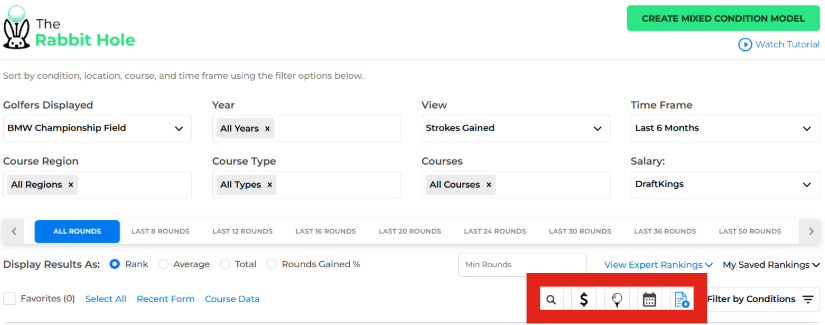
The Dollar Sign Icon will toggle the data table to either show or hide DFS salaries. This creates a bit more room on the screen to view the columns and has been requested by users that are not interested in DFS.
The Ball on Tee Icon has a similar functionality, adding or hiding a column showing each players upcoming tee time. Just like DFS Salaries, this is a sortable column where you can order the players by earliest or latest tee times.
The Calendar Icon gives you a bit more flexibility in the Time Frame of data you want to look at. This was another user request since we are simply only able to list so many different time frames under the drop down. This will be especially useful for looking at portions of the season while not including the most recent results. For instance, you now can pull up last year’s Swing Season results by entering the begining and end dates to only emcompass those events.
The blue Download File Icon isn’t a new feature, it’s just been relocated to clean things up. This is the download as .csv function and will pull whatever data you are displaying below into a file and download it for you.
Want More Out of the Rabbit Hole?
As I mentioned, most of our updates are based on user feedback. Email us at support@betspertsgroup.com, DM us on Twitter @BetspertsGolf, or just message us in the members Discord. We’d love to impliment your idea!